I’m not a Unity developer. So this list is for non game devs' Please comment if you have a working config that didn't need a step.
1. ChatGPT Astra is only several days from its announcement so docs are a bit scarce. This changes things for you
in terms of options.
2. I personally got success with the latest version of Unity running on windows 11
3. There may be other options but I had to personally be max current.
4. Install Unity Hub latest ver. I skipped Unity Cloud. But subsequently had to link it to my organization.
5. If Unity Hub is asking whether you want to launch/install a CLI (Command Line Interface), skip it for now.
6. Again this may not interfere, this was my working install
7. Look for a template named Universal 3D. It IS under Core
8. Give the project a simple name: AstraTest
9 Turn AI Assistant ON
10 Click Create project.
11. I spent hours at this point trying to figure out the next steps it turns out...
12. I ended up enabling dev data sharing in the pursuit of figuring this out. If it is not needed let me know.
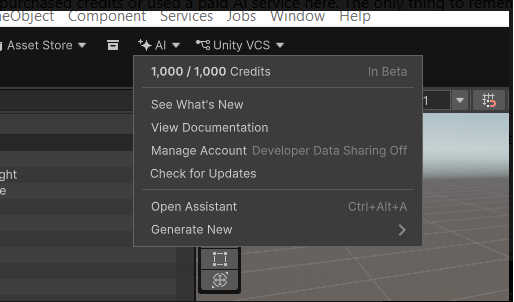
13. There is an AI tab that goes to manage subscriptions in game engine, I did the 14 day trial
14. Im "noteing" that after purchase free trial it starts off saying you have no credits so im reloading just in case..
I havent used anything thats not a trial ok it worked to do that now i have 1000 credits and a menu
15. Reference Figure 1 After installing free trial and relaunch game I had 1000
credits and a Open Assistant menu item
16. Next you will need OpenAI Codex if you dont have it.
17. In working code with Chat GPT Astra light enabled run this link in description
%USERPROFILE%\.unity\relay\relay_win.exe --mcp
Do NOT just put it in the command prompt or PowerShell? - I did this and it proved the MCP connection good, but things started working for real right after
I did this in the Codex shell
18. If you're not sure if anything working like me look at -> Edit > Project Settings > AI > Unity MCP. The Unity Bridge will have green light.
Use the prompt in the description...
"Create a simple playable 3D game in this Unity project using only built-in Unity primitives and assets.
Make a floor, a player that I can control with WASD or arrow keys, a camera that follows the player, and several collectible objects.
When the player touches a collectible, remove it and increase an on-screen score. When all collectibles are collected, display “You Win!”.
Create any C# scripts you need, configure the scene, and test/fix the game so it runs.
Do not require me to manually create objects or scripts."